
Archive for September, 2008

There are many cool little Firefox tweaks that users often don’t know about, all hidden away and editable from a special link within Firefox. These following tweaks will make your Firefox quicker and more efficient for today’s broadband connection.

To get to this special menu, in the address bar type about:config and then press enter. Firefox 3 presents you with an extra button asking you to “promise and be careful” which you can safely click.

Now you should be presented with a list of options that you can change to improve Firefox’s performance. Below are some common settings that can be changed. Simply click on the filter box and search for the following settings and change their values as below:

  • network.http.pipelining → true
  • network.http.pipelining.firstrequest → true (Not in Firefox 3)
  • network.http.pipelining.maxrequests → 32
  • network.http.proxy.pipelining → true
  • nglayout.initialpaint.delay → 0 (Not in Firefox 3)

These little gems will help your Firefox fly faster. Pipelining allows multiple HTTP 1.1 requests to be sent before any responses are received from the browser, hence allowing you to ask for more data at once. Give it a go and try it out – you’ve got nothing to loose!
Tags: , , , , Categories: Firefox Comments Off on Increase download speed with Firefox

With the release of Google Chrome, John Resig has performed JavaScript benchmark tests on a wide variety of browsers on both Windows Vista and XP. These browsers include:

  • Chrome 0.2
  • Safari 4
  • Safari 3.1.2
  • Opera 9.5.2
  • Firefox 3.1
  • Firefox 3.0.1
  • IE7
  • IE8 Beta 2

Testing, using three benchmarking tools; SunSpider, V8 Benchmark, and Dromaeo, has produced some interesting results. Results show that Google Chrome is ahead in all but one benchmark test – very impressive for a browser that is still in its early beta stages. It shows the performance of the new V8 JavaScript engine and the power of the WebKit rendering engine found in both Chrome and Safari.

You can read the full JavaScript Performance Rundown article to see the other (not-so)surprissing results.

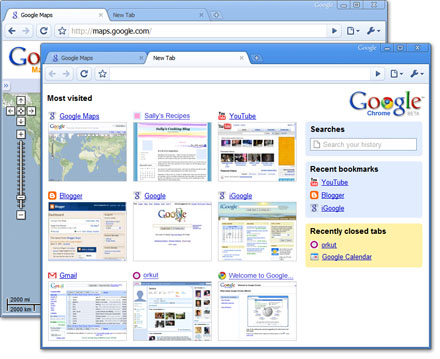
Google Chrome browser in action

Google Chrome browser in action

Google has just thrown a huge spanner into the browser war with the release of their new web browser, Google Chrome. According to Google, “Google Chrome is a browser that combines a minimal design with sophisticated technology to make the web faster, safer, and easier.

Early testing seems very promising, and I have found the browser to be fast and responsive, even though it is still in beta at version 0.2. There still seem to be a few rough edges, but I would think we will see these ironed out as we see new releases.

Built on WebKit technology, Google Chrome includes some useful new features, including:

  • Address bar under each tab
  • Individual windows are in their own “sandbox”
  • Thumbnails of your favourite sites
  • One search bar for searching and typing URLs

In the next few days I plan to give a more indepth review of Google Chrome as I have more time to play with the browser. If you haven’t already, you can check Google Chrome out at http://www.google.com/chrome/.

How have you found Google Chrome so far?

Tags: , , , Categories: Chrome Comments Off on Google releases Chrome browser

Welcome to Browser Watch. I aim to keep you updated with the latest in web browser technology news. Stay tuned for more articles.

Categories: Browser Watch Comments Off on Welcome to Browser Watch